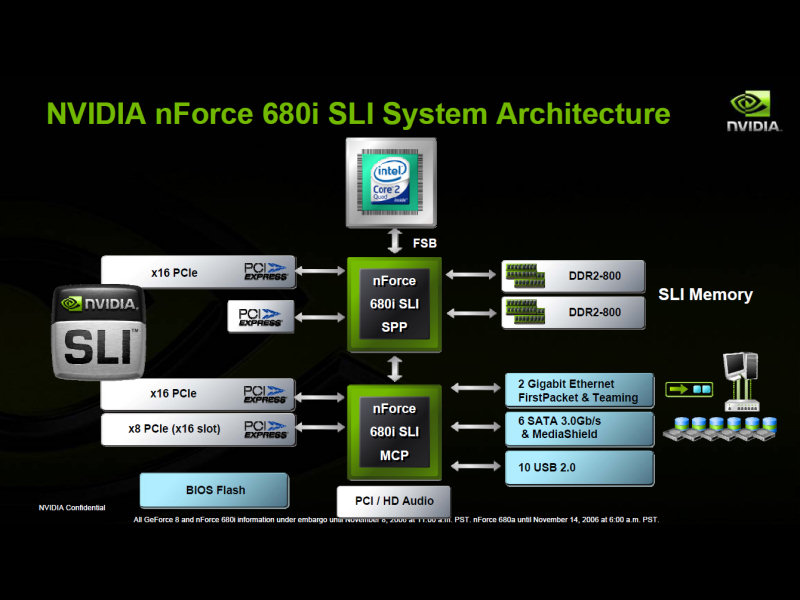
使用G92的8800GTS 512MB版今天正式發表。
PCWatch:多和田新也のニューアイテム診断室 65nmプロセスコア搭載の”新”「GeForce 8800 GTS」
ITmedia+D:“G92″世代「GeForce 8800 GTS 512M」の微妙な立ち位置を探る
4gamer.net:その実力はGTX級。G92コア採用の「GeForce 8800 GTS 512」レビューを掲載
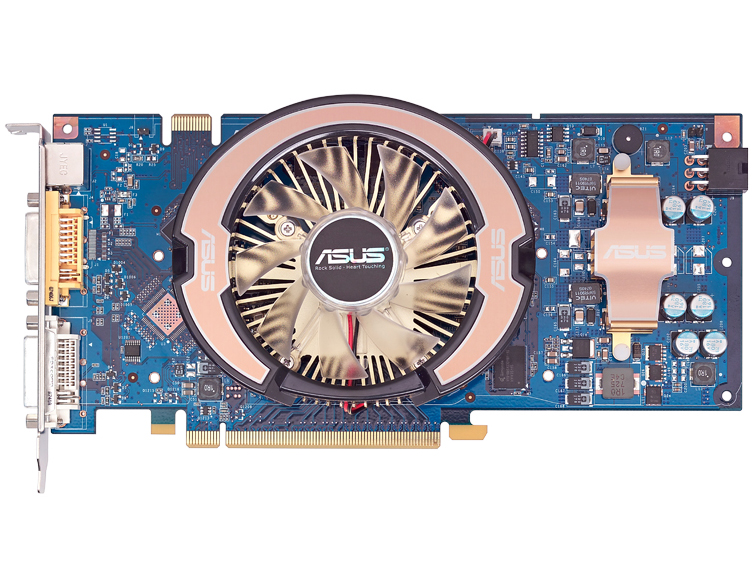
雙層風扇的風扇直徑與G80用的相同,運作溫度是80度,實質上與G80的差距沒有想像中大,不過耗電量差比較多,自行修改的散熱機制看來是必須了。
88GTS的供電迴路部分果然補齊三相,在電源本身不再有限制的狀況下,即使與88GT使用同樣的記憶體,88GTS仍然好超很多(GZ剛拿到就有人超到800/200/2200以上),所以一如預期88GT實質上是限縮版,非公版88GT大概會做一些類似的處置。
大部分狀況下性能接近G80版8800GTX,不過記憶體容量吃緊的時候會被甩開,所以可以推估如果有256bit 1GB版,在高負荷狀況下的落差應該會改善
與G92版88GT的差距並不明顯,定價的漲幅比性能提高的比例來得高,光增加一個TPC性能相差很小,所以預設時脈也有差距(core/shader/mem = 650/1625/2000),加上電源迴路的限縮來隔離GT與GTS;但是因為88GT准許非公版設計,所以其實這是擺好看的。
參考:ASUS 8800GT 1GB
http://pc.watch.impress.co.jp/docs/2007/1207/asus.htm
—–
補充:幾段Crysis的物理模擬效果demo
這些應該都是GPU跑的….尤其是sys_physics_CPU的開關效果非常驚人,據稱用CPU的狀況下4GHz的Quad-Core也只能跑個3fps;不過物理行為的精確度有掉一些,看起來不太自然的狀況也增加。
根據過去NVIDIA的說法,物理模擬是長度在1000op以上的超長shader,但是看來並非分支吃重….也許G7x就可以跑得很好?
[EDIT]
http://japan.gamespot.com/news/story/0,3800076565,20350114,00.htm
底下jyuriko兄扔的SPE物理性能評價數據來源。
http://developer.nvidia.com/object/havok-fx-gdc-2006.html
NVIDIA在2006年三月發表的GPU Physics。
—–
[再補充]
http://www.musicvideos.idv.hk/Crysis–Mass-Physics__VaHS-y_mapQ.html
THESE ARE NOT IN GAME FRAMERATES!
Alot of people are opening Crysis, putting in the code and expecting physics to run smoothly like in the video, it won’t (unless you have such an uber beast but I don’t think a machine available now could do this amount of stuff at 30fps).
To see how I made the physics so smooth, look at the tutorial I made for making your own: http://forums.facepunchstudios.com/showthread.php?p=8179898 The song is “Aberdeen City – Pretty Pet” You can download the man made out of boxes from here: http://www.crymod.com/thread.php?threadid=10448 (XYZ) The command is for rendering a video with capture_frames, actual gameplay will be extremely low frames per second, capture_frames isn’t affected by low fps but the physics having their own framerate do.
The video isn’t about how good Crysis or Cryengine2 is but it was actually made simply because I liked the look of lots of boxes flying around and structures collapsing etcetera and thought other people might like to see this also.
Higher quality versions:
Stage6 (stream):
http://www.stage6.com/user/Neillithan/video/1911267/
(thanks to http://www.youtube.com/Neillithan for this)
Filefront (download):
http://files.filefront.com/Crysis+Mass+Physicswmv/;9176864;/fileinfo.html
Rapidshare (download):
http://rapidshare.com/files/80206218/Crysis_-_Mass_Physics.wmv.html
If you want to upload it elsewhere yourself, please inform me with a message so I can add the link to it here.
Due to popular demand, I’ll post my specs but they only really effect the very first clip showing sys_physics_CPU 1 and how many boxes total I can render, which unfortunately limited the last clip. So, my system specs are:
Intel Core 2 Duo 4300 (1.8GHz) processor, overclocked to 2.2GHz, 2GB 800MHz RAM, Nvidia 512mb 7900GS GPU (DX9).
I get a Windows Vista base score of 5.1, RAM and CPU being the 5.1, HDD transfer rate at 5.5 and GPU at 5.8 for gaming, 5.9 for Aero.
But system specs will only change the speed of capturing it if you were to do this, the rendered video will be at whatever framerate you set to record and playback at.
I used the very high settings tweak for DX9
http://files.filefront.com/Very+High+for+DX9+Tweak/;9184685;/fileinfo.html
Then some commands I used ontop of that for this were:
sys_physics_CPU 0
fixed_time_step 0.033333
e_particles 0 (all those particles when a box would collide with something killed my GPU)
r_motionblur 4 (need the very high tweak if on DX9)
r_useEdgeAA 2 (fake anti aliasing, blurs edges)
r_displayinfo 0 (get rid of the white text when in devmode/sandbox)
cl_hud 0 (gets rid of the HUD)
capture_frames 1 (to take a screenshot at every frame so you can add them all together to make a smooth motioned video).
e_view_dist_ratio 200 (only in the last clip as I only really needed it then, though it would’ve been nice if I knew about it before; it makes the distance at which objects stop becoming visible further)
The motion of the boxes was done by tornadoes made invisible due to particles being disabled. The settings where changed around though such as in some clips there was no rotation. But there was one clip that used a “GravityVolume” found in Misc in objects in the rollup bar. Yes, there is still some physics lag when sys_physics_CPU is set to 0, but it’s SOOOO much smoother than if set at 1 when there’s that many physical interactions going on and I think it’s an actual physics engine problem where they can lock when colliding, they can’t get past what’s infront of them rather than it actually lagging like when it’s set to 1. If there was nothing in the way of a moving object, it won’t lag on 0 but can on 1.
The last clip wasn’t anywhere near as massive as I wanted it to be, unfortunately my GPU couldn’t handle rendering all the boxes when I doubled the amount of what is shown in the video so I left it as that rather than trying to find an actual limit of what it could handle incase it needs power to render the motion blur and stuff. For more info, see the tutorial (first link in this description). I PANT3RA I approves of this video. I like the “Crysis Physics Porn” that’s a common title for this to be linked from, it reminds me of a stupid image I made once for the lulz: http://i18.photobucket.com/albums/b101/Martzno8/Crysisporn.jpg Eww, look at the ugly mountain in the background…
所以其實上面的demo並不是in game framerate…. 而Crysis的物理是自製,CPU only。